
OopBuy Warehouse: Separate the Parcel Candidates
Before choosing an OopBuy parcel action, establish which items are actually associated with your warehouse records and which questions remain unresolved. Keep quantity, option and the relevant date beside each item. A personal note such as “ready to compare” is not a replacement for the platform's own record.
Keep three lists distinct
Separate products you are considering, items associated with an order or warehouse record, and the contents of the parcel you intend to request. Moving a row in your spreadsheet does not itself move an item between these stages.
Open the white graphic T-shirt as a design reference. The public listing does not establish that a corresponding unit is stored for you. For a real purchase, match the actual option and quantity to its own record before including it in a parcel decision.
Check the item-level question before combining parcels
A photograph can show the number of objects visible in that image, but it does not necessarily account for every item in an order. Match the image set and records before deciding that the complete quantity has arrived. The QC guide helps separate visible evidence from assumptions about the rest of a purchase.
If a size or detail question remains open for one item, keep that question attached to it. Do not treat a clear image of another item as approval of both. The order-status guide explains how partial updates can concern only part of a purchase.
Read the storage clock that applies to the item
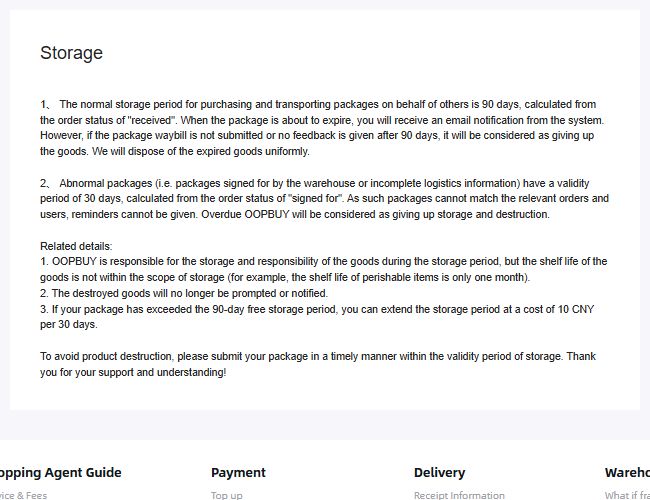
Policy image saved on 10 September 2026. The normal and unmatched-package paragraphs describe different cases; neither calculates the remaining time for a particular order.
An OopBuy storage-policy screenshot archived on 10 September 2026 described a normal 90-day period beginning at the “received” status. It separately described 30 days from “signed for” for abnormal packages that could not be matched to the relevant order or user, with no reminder possible in that situation. It also described expiry-related disposal and an extension costing 10 CNY per 30 days after the normal free period.
That is a dated policy record, not a calculation of your current deadline. Check the applicable item record and current conditions before relying on a storage period or extension. In particular, do not assume that a date from an unmatched package and a normal received-item date start the same clock. Resolve an unclear date rather than waiting for a reminder that may not apply.
An extension and product suitability are separate decisions. The same notice excludes shelf life from its storage responsibility, so paying to retain an item does not establish that it will remain usable. Keep any expiry condition beside the item when deciding whether waiting for a larger parcel makes sense.
Build the estimate from the proposed contents
For a hypothetical planning comparison, you might model a parcel with two items and another with three. Label both as estimates. Do not present the second scenario as a measured packed parcel while one item is still only a candidate.
Distinguish product weight from packed weight, and record which contents and packaging each set of dimensions describes. The shipping calculator guide helps keep those inputs consistent. A change in contents or packing can make an older comparison inapplicable.
Confirm instructions before using a warehouse address
If you are searching for an OopBuy warehouse location to arrange delivery, use the receiving instructions supplied for your actual account and service. Do not substitute an app developer's business address or an address copied from another customer's screenshot. Verify the required recipient and reference details through an established channel before sending anything.
For an unmatched item or unclear storage record, prepare a precise private enquiry using the support guide. Describe the mismatch and provide necessary references privately; do not post full addresses or shipping labels publicly. Return to the ordering guide once the item questions and intended parcel contents are clear.